



At a glance: A skincare brand with finished goods made by contract manufacturers sells through its Shopify store, to a distributor that supplies pharmacies, and to overseas wholesalers. It buys finished stock from those manufacturers and keeps its books in Xero, with an accountant who works only in Xero. The accountant needed values without access to stock records, and the two sets of figures kept drifting apart. In Qoblex, which owns quantities and costs, invoices and supplier bills reach Xero within minutes, inventory journals follow on the overnight sync, and month-end is one comparison of two totals.
What does one Shopify sale of a skincare product put into Xero?
For a skincare brand running Qoblex and Xero, one Shopify order for a cleanser sold at 24.00 puts 24.00 of revenue into Xero on an invoice within minutes, and that night’s sync adds an inventory journal that moves the cleanser’s 6.00 cost out of the Stock On Hand Account and into the Cost Of Goods Sold account. Let’s assume the brand sells a cleanser at 24.00 and a serum at 48.00 through its Shopify store, at moving average costs of 6.00 and 11.00, with every amount in its own currency and before tax. A cleanser then earns 18.00 and a serum 37.00 before shipping, which is the whole economics of one unit.
Nobody types the 6.00. Qoblex records the cost when the shipment is dispatched, as the quantity shipped times the moving average cost at that moment, so the revenue and the cost are two postings on two rhythms: the invoice goes when the order is paid, and the journal goes when the overnight sync runs. The accountant reads both halves in Xero and never needs to know how many cleansers are left on the shelf. Before the brand set things up this way, though, the stock figure and the accounting figure rarely agreed.
How did a skincare brand’s stock figures and accounting figures drift apart?
A skincare brand’s stock figures and accounting figures drifted apart because, before Qoblex held the quantities, stock was counted in more than one place and only some of those places were updated when goods moved. Finished goods arrived from contract manufacturers in lots, and orders came from the Shopify store, the pharmacy distributor and the overseas wholesalers. The store kept its own counts while the same items were tracked in Xero for the books, so every correction had to be made twice, by someone who remembered to make it.
None of that was careless. With a handful of products and one channel, one place holding quantity and value is the simplest thing that works, and Xero is built for it: Xero’s US page says that “Tracked inventory in Xero shows the quantity on hand and total value of up to 4000 items, and both figures change as you buy and sell” (checked on 30 October 2026; your region’s page may differ). The strain came when stock left through three doors at three paces, a parcel at a time to consumers and a carton at a time to the trade.
The accountant worked only in Xero, rightly, because an accountant needs values rather than a stock spreadsheet, so by month-end the counts and the books disagreed and nobody could say by how much without taking the stock apart by hand. Three questions show whether a brand is there: what has to be checked by hand before anyone trusts the stock figure, where someone has to remember what the system does not know, and who needs access to operational records just so the books can close. When the answers all point to one busy person, the work needs splitting another way.
How does a skincare brand split the work between its inventory system and Xero?
For a skincare brand on Qoblex and Xero, Qoblex owns the quantities and the cost of every unit and Xero owns the books: products reach Xero as untracked items, and Qoblex posts the value of every stock movement to Xero as journals to the Stock On Hand Account, the Cost Of Goods Sold account and the Inventory Adjustments account. Shopify orders arrive in Qoblex, which raises the invoice from what Shopify reports and sends it to Xero, so the same inventory system sits between the store and the books.
Qoblex sends products to Xero as untracked items, so Xero shows the item code and price on invoices and bills and Qoblex holds the quantity and the cost. Each of the three accounts has one job: Stock On Hand for stock held, Cost Of Goods Sold for what shipped, and Inventory Adjustments for loss, shrinkage and write-offs. Whoever set up the Xero integration chose those accounts with the accountant on its Inventory tab, along with Sync journal status, Draft or Posted, depending on whether the accountant wanted to review each journal first.
From then on the accountant reads invoices, bills and journals in Xero with no Qoblex login for day-to-day work, and month-end needs one figure from a Qoblex report. Qoblex sends invoices and bills, with an optional Two way payment sync for payments, so Xero stays the book of record and nobody keeps a second ledger. The Xero integration is a paid add-on on Starter and Business (see pricing). What remains is timing, because documents and journals reach Xero at different moments.
Which documents reach Xero within minutes, and which wait for the overnight sync?
For a skincare brand on Qoblex and Xero, sales invoices, refunds, supplier bills and payments reach Xero within a few minutes of being authorised in Qoblex, while the inventory journals for shipments, receipts and stocktakes go once a day on an overnight sync that runs at 20:00 UTC. Authorisation is the trigger, as the Xero overview explains. For a Shopify order, Qoblex raises the invoice from what Shopify reports, on a new payment or when the order is fully paid or refunded, and authorises it automatically. A wholesale invoice raised by the person who takes the distributor’s order goes as soon as it is authorised.
Each sale therefore posts individually, as its own invoice, and the journals sit on the cost side. That night’s sync carries the journals for the day’s shipments and receipts, and each transaction shows its own Journal Sync status on the Sync Status tab. The same chain from Shopify through Qoblex to Xero runs for every order that comes in through the Shopify integration, and a brand that prefers one send a day can turn on Enable invoice batching.
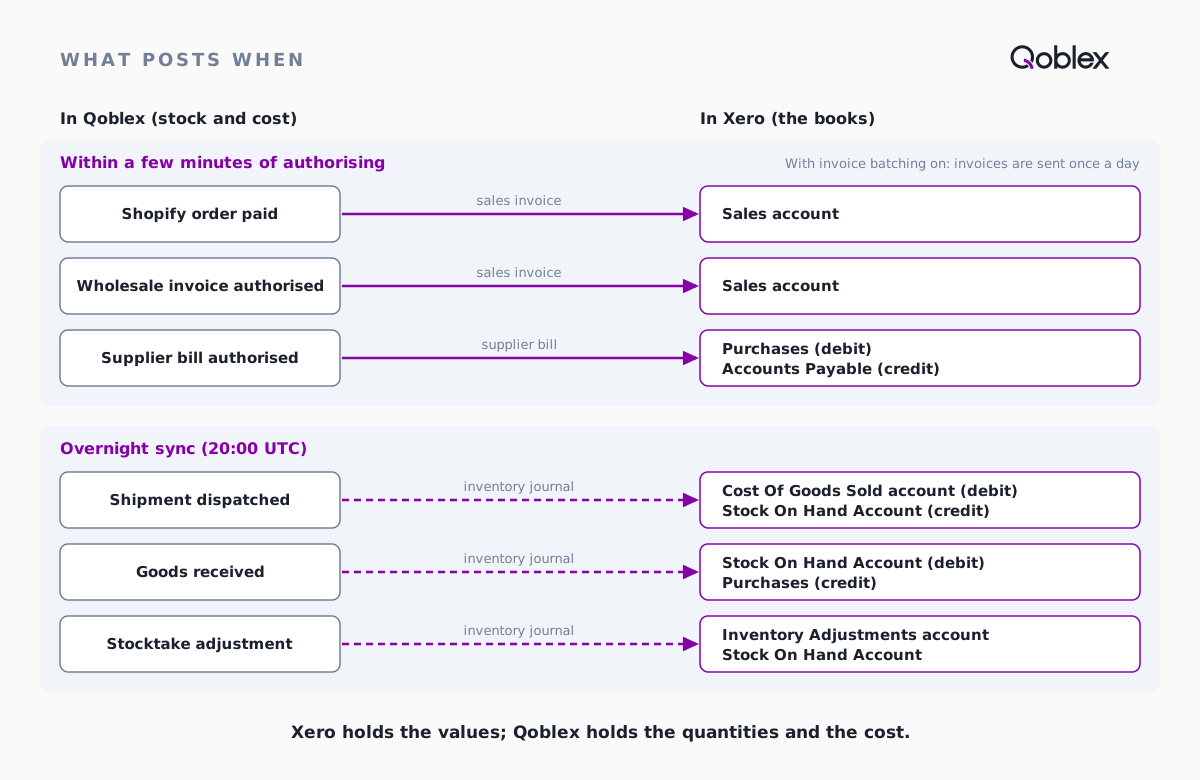
For the accountant, revenue is in Xero by the afternoon and the cost arrives after the overnight sync, so the habit is to read margin the next morning, once both halves are in. Purchases follow the same two rhythms, and that is where the split shows most clearly.
How do purchase orders in inventory software sync with Xero?
For a skincare brand buying finished goods from a contract manufacturer, what a purchase order in Qoblex inventory software posts to Xero accounting software comes in two steps: the supplier bill reaches Xero within minutes of being authorised, debiting the Purchases account and crediting Accounts Payable, and receiving the goods adds an inventory journal on the overnight sync that debits the Stock On Hand Account and credits the Purchases account. There are two steps because the bill is the manufacturer’s claim on the brand and the receipt is stock the brand can sell, and the two rarely land on the same day.
So the Purchases account works as a goods received, invoice received clearing account: when a delivery is billed and received at the same value, it nets to zero. A balance left behind means goods billed but not received, goods received but not billed, or a price difference, and the accountant reads it as a to-do list rather than an error (GR/IR explained). On the Qoblex side, the warehouse team receives each delivery against its purchase order, and part deliveries and split bills work as they do for a cosmetics importer’s purchase order. With a sale and a purchase each traced, one ordinary day shows how the pieces add up.
What does one day of orders, a wholesale invoice and a delivery post to Xero?
For a skincare brand on Qoblex and Xero, one day with 60 Shopify orders, one wholesale invoice and one delivery from a contract manufacturer puts 8,720 of revenue and a 10,400 supplier bill into Xero within minutes, and the overnight sync adds 3,040 of cost of goods sold and a 10,400 receipt to the Stock On Hand Account. Let’s assume 60 Shopify orders are paid that day and each order ships on its own: 20 with a cleanser only, 10 with a serum only and 30 with both, which comes to 50 cleansers and 40 serums. That morning the person who takes the distributor’s order authorises an invoice to the pharmacy distributor for 200 cleansers at 14.00 and 100 serums at 28.00, and the warehouse team ships it the same day.
A delivery of 1,000 cleansers and 400 serums also arrives from the contract manufacturer against a purchase order, and the bookkeeper authorises its bill the same day. The manufacturer’s unit prices match the current moving average costs, so the averages do not move, and the order carries no freight or duty, which would otherwise join the unit cost through landed costs.
| What happens in Qoblex | Reaches Xero | What posts in Xero | Amount |
|---|---|---|---|
| 60 Shopify orders paid (each its own invoice, authorised automatically) | Within minutes, order by order | Revenue on the sales account: cleansers 1,200 + serums 1,920 | 3,120 |
| Wholesale invoice to the pharmacy distributor authorised | Within minutes | Revenue on the sales account: cleansers 2,800 + serums 2,800 | 5,600 |
| Contract manufacturer’s bill authorised | Within minutes | Debit Purchases, credit Accounts Payable | 10,400 |
| 60 Shopify shipments | Overnight sync | Debit Cost Of Goods Sold, credit Stock On Hand: cleansers 300 + serums 440 | 740 |
| Wholesale shipment | Overnight sync | Debit Cost Of Goods Sold, credit Stock On Hand: cleansers 1,200 + serums 1,100 | 2,300 |
| Delivery received (1,000 cleansers, 400 serums) | Overnight sync | Debit Stock On Hand, credit Purchases: cleansers 6,000 + serums 4,400 | 10,400 |
The overnight rows are the inventory accounting journal entries Qoblex posts for the day’s shipments and the receipt, and the accountant typed none of them. The day earns a gross margin of 5,680 before shipping and overheads, the Stock On Hand Account rises by 7,360, and Purchases ends the day at zero because the bill and the receipt carry the same value. A day is easy to check by eye; the month is where a tie-out earns its keep.
How does month-end reconcile when the inventory system owns the stock numbers?
For a skincare brand on Qoblex and Xero, month-end reconciles by comparing two totals once the overnight sync has run: the Total Cost column on the Stock on Hand tab of the Inventory report in Qoblex, and the balance of the Stock On Hand Account on the Xero Balance Sheet. The method comes from Qoblex’s guide to lining up the books, and it works only when nothing has moved since the last sync, because Total Cost is each product’s quantity at its current Moving Average Cost.
Let’s assume the month opened with 1,500 cleansers at 6.00 and 700 serums at 11.00, 16,700 in all, and that the Xero Stock On Hand Account opened at 16,700 too, with Purchases at zero. The day above brought the month’s only delivery, and the month shipped 1,750 cleansers and 650 serums. On the 20th the warehouse team counted stock and found 10 serums fewer than Qoblex showed, so the stocktake posted 110 overnight against the Inventory Adjustments account.
| Line | Amount |
|---|---|
| Xero Stock On Hand Account, opening balance | 16,700 |
| Receipt journals in the month | +10,400 |
| Shipment journals in the month (Cost Of Goods Sold) | -17,650 |
| Stocktake adjustment (Inventory Adjustments) | -110 |
| Xero Stock On Hand Account, closing balance | 9,340 |
| Qoblex Total Cost: cleansers 750 x 6.00 = 4,500, serums 440 x 11.00 = 4,840 | 9,340 |
| Difference | 0 |
| Purchases account: day’s bill 10,400, less its receipt 10,400 | 0 |
| Purchases account: bill for 300 serums not yet received | 3,300 (debit) |
The two stock figures agree because every movement that changed a count in Qoblex also sent its value to Xero, and nothing else touched the account. At the screen, the tie-out takes eight steps:
- Wait until the daily sync at 20:00 UTC has run and nothing has been shipped, received or adjusted in Qoblex since. Depending on your time zone that sync can fall in your afternoon, so for month-end compare after the first sync that follows the month’s last movement and before anything else moves.
- Open the Sync Status tab of the Xero integration, turn on Only Failed Transactions, set Created At to cover the month, and check each transaction type in turn; fix the cause of anything listed, then resend failed sales, refunds and purchases with Sync to Xero.
- In Xero, check that every inventory journal Qoblex sent is posted, because a journal left in Draft does not move the balance.
- In Qoblex, open Reporting > Inventory and the Stock on Hand tab, and add up the Total Cost column for your locations.
- In Xero, open the Balance Sheet as at today’s date and read the balance of the account you mapped as the Stock On Hand Account.
- Compare the two figures: in the example both read 9,340.
- Open the Purchases account in Xero and match its balance to the supplier bills for orders not yet received (3,300 in the example).
- If the stock figures differ, check first for a journal still in Draft, a movement since the last sync, or an account set to Do Not Sync, before anyone posts a correcting journal.
The 3,300 on Purchases is a second order, 300 serums at 11.00, billed on the 28th and still on the water, so it explains the balance the accountant sees and is not a difference in stock on hand. When the warehouse team receives those serums on the 3rd of next month, the receipt journal debits Stock On Hand and credits Purchases by 3,300, and the balance clears. Nothing in that rhythm is particular to skincare.
Does this fit your business?
The Qoblex and Xero split, with Qoblex holding stock and cost and Xero receiving invoices, bills and inventory journals, fits a skincare brand and its neighbours that sell direct and wholesale with Xero as the books. A hair and beauty brand with a few hundred SKUs runs the same story with a longer product list, and a cosmetics or fragrance brand buys and sells in the same shape.
A supplement brand gets the same split, and batch and expiry tracking on received goods is a separate paid add-on on Starter and Business, included on Scale, which this story does not cover (lot tracking). Other wholesale brands on Xero will recognise the day and the month, and a brand that also splits stock between a fulfilment partner and its own warehouse will find that story in stock by channel for a skincare brand.
It does not fit a business happy with Xero’s own tracked inventory, selling a handful of items on invoices through one channel. Xero’s US page says “Xero suits businesses that sell via invoices, track up to 4000 items, and use average cost valuation” (checked on 30 October 2026; check the page for your region), and for that business staying put is the better call, as when Xero alone is enough explains. A brand on QuickBooks Online gets the same split with QuickBooks’s own settings, with the sync running one way, Qoblex to QuickBooks; see the QuickBooks integration, QuickBooks inventory and keeping products non-inventory.
Frequently asked questions
Should a skincare brand keep tracking stock quantities in Xero, or hold them in the inventory system?
Hold them in the inventory system. With Qoblex, quantities and the cost of each unit live in Qoblex, products reach Xero as untracked items, and Xero receives values only: invoices and bills within minutes of authorisation, then inventory journals overnight. The accountant works from those entries in Xero.
Can the accountant work only from journals in Xero, with no access to inventory records?
Yes. Invoices, supplier bills and inventory journals to the Stock On Hand, Cost Of Goods Sold and Inventory Adjustments accounts all arrive in Xero. Month-end needs one figure from Qoblex, the Total Cost on the Stock on Hand report, which someone with Qoblex access reads for the accountant to compare with the Xero Balance Sheet.
Does each sale post to Xero individually or as a daily journal?
Each sale posts as its own invoice, within a few minutes of being authorised in Qoblex. The cost side runs separately: the overnight sync sends the inventory journals for the day’s shipments and receipts, and each transaction shows its own Journal Sync status. With Enable invoice batching on, invoices are grouped and sent once a day instead.
How do purchase orders in inventory software actually sync with my accounting software?
With Qoblex and Xero, the supplier bill on a purchase order reaches Xero within minutes of authorisation, debiting the Purchases account and crediting Accounts Payable. Receiving the goods then adds an inventory journal on the overnight sync, debiting the Stock On Hand Account and crediting Purchases. When bill and receipt carry the same value, Purchases nets to zero.
What is the difference between Draft and Posted for inventory journals?
Sync journal status sets what happens to each Qoblex inventory journal in Xero. Draft leaves it waiting for the accounting team to review and post, and a draft does not move the Stock On Hand balance. Posted posts it automatically once it syncs. Choose Draft if the accountant reviews journals before they count.
What does invoice batching change?
Enable invoice batching, on the Sales tab of the Qoblex Xero settings, groups invoices by tax settings, currency and sales rules and sends them once a day instead of within minutes of authorisation. Revenue then reaches Xero at the daily send rather than sale by sale. Inventory journals keep their own overnight sync.
What happens if an item is also tracked in Xero?
Xero’s US page says that when a tracked item sells, Xero “records the cost of goods sold (COGS) and updates your inventory asset account using the average cost method”. If Qoblex also posts its journal for that sale, the cost lands twice. Keep the products Qoblex manages untracked in Xero.
Where can I see that a journal reached Xero?
On the Sync Status tab of the Qoblex Xero integration. Each transaction row has a Journal Sync column showing whether its journal exists in Xero, plus a Xero link to the document. Failed pushes retry automatically; anything still unsent shows as failed and, once the cause is fixed, can be sent again with Sync to Xero.