



At a glance: A wine and spirits trader, mainly whisky, buys maturing casks and bottles from producers and other traders in several currencies, holds stock in several countries, sells to trade customers and keeps its books in Xero. Its margin on each deal depended on which exchange rate was applied. In Qoblex, every purchase order and sales order carries an exchange rate the team can set, each country is a warehouse location, and bills and invoices can reach Xero in their original currency.
What are the signs a wine and spirits trader has outgrown spreadsheets and Xero alone?
A wine and spirits trader that buys in several currencies and holds stock in several countries has outgrown spreadsheets and Xero alone when the margin on a deal depends on which exchange rate was applied and nobody can say which. A trader of this shape buys casks and bottles from producers and other traders, each billing in its own currency, and sells to the trade, where each deal’s margin is the business.
The buyer agreed one rate, the person who raised the sale used another, and the books took the rate of the day, so the margin was whatever that mix made it. Because the item carried one sell price, an invoice in another currency was repriced by hand. And “how many cases do we have, and where?” meant messaging each country.
None of that was careless: with a few deals a month and stock in one place, a spreadsheet beside Xero was the right tool. The signs it has done its job are a margin checked by hand before anyone trusts it and a rate someone has to remember. Landing freight into the cost of a foreign-currency purchase is a separate story; this one is the margin on both sides, and the choices for keeping it.
What are the options for a trader who buys and sells in several currencies?
A wine and spirits trader that buys and sells in several currencies has three realistic options: stay on Xero with spreadsheets, use Xero’s own multi-currency and tracked inventory, or add a system like Qoblex that keeps Xero as the books.
| What the trader needs | Stay on Xero with spreadsheets | Xero's own multi-currency and tracked inventory | A system like Qoblex beside Xero |
|---|---|---|---|
| Buying in a foreign currency | A rate looked up and typed by hand | Converts a foreign-currency invoice or bill at the current rate | An Exchange rate field on each purchase order, editable until billed |
| Using a rate agreed with the other side | The agreed rate lives in a note | Rate override on any individual invoice, bill or payment | The buyer or seller types the rate on the order |
| Stock in several countries | A count per place, kept by hand | Tracked items hold quantity on hand and average cost | Each country is a warehouse location; stock moves by stock transfer |
| Quoting a customer in their own currency | The invoice is repriced by hand | A foreign-currency invoice raised in Xero | A price list in the customer's currency, matching the order currency |
| What reaches the books | Whatever the team posts | Xero is the books | Bills and invoices, in original or base currency, per two settings |
| Plan needed | The existing Xero plan | Multi-currency listed as included on higher plans (US: Established; check your region) | The Xero integration is a paid add-on on Starter and Business; Starter caps at two warehouse locations; see pricing. Keeping the original currency in Xero also needs a Xero plan with multi-currency |
Xero already does the accounting half well, as its own multi-currency page, tracked inventory page and US pricing page set out; plans differ by region, so check your own. The difference for a trader is where the agreed rate lives. Xero lets the team override the rate on any individual invoice, bill or payment, while a buyer agrees it with the producer when the deal is struck, often days before the bill arrives, and a system beside Xero can hold it on the purchase order from that moment.
Closing that gap between the deal and the document is what a system beside Xero is for, and many traders do not need it closed yet.
When is staying on Xero and spreadsheets enough for a wine and spirits trader?
A wine and spirits trader can stay on Xero and spreadsheets when it buys in one or two foreign currencies, does a handful of foreign-currency deals a month, holds stock in one place and types the agreed rate where it is needed. If nobody asks what a deal made at the agreed rate, or which country a case is in, a second system is a cost without a return.
The test is practical, not a size threshold. When the buyer and the seller disagree about which rate a deal used, or a stock count needs a call abroad, the spreadsheet has done its job. A trader does not need an ERP for that, only the rate and the stock in one record beside Xero, as one deal shows.
How does one deal run in Qoblex, from a euro purchase to a dollar sale?
A wine and spirits trader runs one deal in Qoblex as a purchase order in the supplier’s currency, a receipt into a warehouse location, a stock transfer if the stock moves country, and a sales order in the customer’s currency, with an Exchange rate field on both orders and the bill and invoice going to Xero. That is inventory software that handles multiple locations and multiple currencies, in practice.
Let’s assume a trader whose base currency is GBP buys 100 cases of bottled whisky from a producer that invoices in EUR at 600 per case, sells the same 100 cases to a trade customer that pays in USD at 750 per case, and holds the stock in a warehouse location in one country before moving it to a location in another. All amounts are before tax and freight. The rates Qoblex holds are 1 GBP = 1.20 EUR and 1 GBP = 1.25 USD.
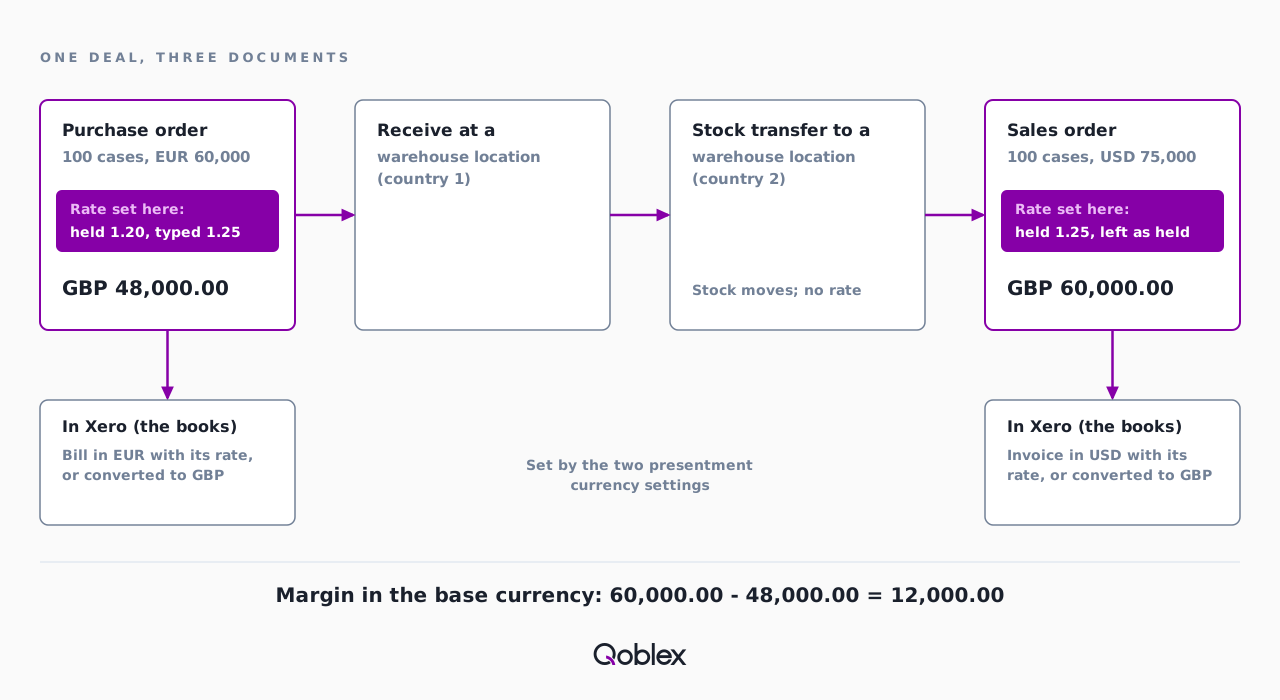
The buyer opens the purchase order and sees 1.20 in the Exchange rate field. The buyer had agreed 1.25 with the producer and types that before adding the cases, because a rate change re-prices any lines already on the order; Qoblex shows the Total in GBP too. Once the cases have moved, the person taking the trade customer’s order opens a sales order in USD, sees 1.25 and leaves it.
| Document | Amount | Rate Qoblex held | Rate the team used | Value in GBP at the rate used |
|---|---|---|---|---|
| Purchase order, 100 cases at EUR 600 | EUR 60,000 | 1 GBP = 1.20 EUR | 1 GBP = 1.25 EUR, typed by the buyer | 48,000.00 |
| Sales order, 100 cases at USD 750 | USD 75,000 | 1 GBP = 1.25 USD | 1 GBP = 1.25 USD, left as held | 60,000.00 |
| Margin in GBP | 12,000.00, which is 20.0 percent of the sale |
That 120.00 a case rests on the rate the buyer agreed with the producer, which is why the buyer types it on the purchase order instead of leaving it to whoever raises the bill. Each sales order line also carries COGS and margin columns. At the screen, the deal runs like this.
- In Account, Currencies, set the Base Currency (GBP) first, since it locks once exchange rates exist. In Foreign Currencies, use Add Exchange Rate for EUR at 1.20 and USD at 1.25, each with Save & close, then Save.
- In Integrations > Xero, agree Sync bills in presentment currency and Sync invoices in presentment currency with the accountant before the first bill is authorized.
- In Inventory > Price Lists, open Actions, choose Add Price List in USD, Save & Close and enter the prices. Set Price List on the US customer’s contact.
- In Purchases, open Create and choose Regular Order. Pick the supplier; the order switches to EUR with 1.20 in the Exchange rate field. Type 1.25, choose Ship To, add the 100 cases at 600 with Add Line Item, then Save and Approve.
- When the cases arrive, select Receive, check Receive At and choose Authorize. Then choose Bill All and Authorize the bill.
- To move the cases abroad, open Transfers, choose Transfer from location and Receiving location, enter 100 as Quantity to transfer and Save; choose Receive once they arrive.
- In Sales, create the order, set Currency to USD and check the Exchange rate shows 1.25. Choose the customer, the Origin location and the 100 cases, and save; past the Quote stage, choose Invoice and Authorize the invoice.
- Check the Sync Status tab under Integrations > Xero to see the bill and the invoice arrive.
The buyer checks the rate before billing, because currency and rate lock once any bill exists, and on the sales order once it is invoiced. Then the accountant asks what Xero receives.
What reaches Xero from a foreign-currency purchase and sale?
For a wine and spirits trader on Qoblex and Xero, bills and invoices reach Xero in their original currency and rate when Sync bills in presentment currency and Sync invoices in presentment currency are on, and in the base currency when they are off. The bill setting, in the Xero purchases settings, is off for a new configuration; the invoice setting sits in the Xero sales settings. The accountant decides which.
Bills and invoices post within a few minutes once authorized, unless invoices are batched daily. Payments recorded in Qoblex go to Xero, with optional Two way payment sync; stock-movement journals go once a day overnight, as the skincare brand’s story explains. The Xero integration is a paid add-on on Starter and Business, and Xero stays the books. With the books settled, the warehouse team’s question is where the cases sit between one country and the next.
How does stock in several countries fit into Qoblex?
A wine and spirits trader with stock in several countries sets each country up as a warehouse location in Qoblex, receives each purchase at the Ship To location where it lands, and moves stock between countries with a stock transfer, so the stock on hand at each location is visible on the product. Each variant’s location table shows In stock, Allocated, Available and Incoming per location, and Origin on the sales order is where cases ship from.
To move cases, the warehouse team creates a stock transfer and chooses Receive only once they arrive, since that is what changes stock on hand; a count error is a stock adjustment instead. The beverage distributor’s story walks the same flow, and a multi-warehouse software comparison sets out the options. Locations live under Account, Inventory & Warehouses; Starter caps at two warehouse locations, so check the locations per plan on the pricing page. Then came the trader’s questions about rates.
Where do Qoblex exchange rates come from, and can a trader set a fixed rate?
In Qoblex, exchange rates come from the Foreign Currencies table under Account, Currencies, where a rate is either updated every hour from OpenExchangeRate when Automatic Exchange Rate Update is on or entered by the team, and a purchase or sales order can carry its own rate typed over the one held. A trader asks this early, because its buyers agree rates with producers when the deal is struck. On the Currencies page, a rate reads as 1 base currency equals so much foreign currency, and a blank or zero rate is rejected.
A changed rate never rewrites completed documents, so when the hourly update moves the euro tomorrow, the purchase the buyer billed today keeps the 1.25 agreed with the producer.
The second question was quoting a customer in its own currency. The order currency must match the price list currency, or Qoblex rejects it as Invalid Price List, so the team keeps a price list per currency and assigns each to the customers who pay in it. With rates and price lists settled, the last question is which businesses this flow fits.
Does this fit your business?
The Qoblex flow of a rate on every order and a warehouse location per country fits importers and distributors of beer, wine, coffee and specialty food that buy in one currency and sell in another across several warehouses (see the food and beverage page). Anyone shortlisting wine distributor software, or trading any goods this way, will recognise the deal. A trader that bottles its own cask stock can use the manufacturing module, with assembly and disassembly on every plan, which this story does not cover.
It does not fit a trader with stock in one place, a few foreign-currency deals a month and a team happy to type the agreed rate into Xero; the multi-currency feature on its Xero plan is the honest answer, with the guide to Xero inventory management for stock. Hedging, forward contracts and a treasury view of currency exposure are outside this story, and a one-currency online shop has no second rate to set.
Frequently asked questions
Where do exchange rates come from in Qoblex?
Under Account, Currencies, the Automatic Exchange Rate Update switch decides whether Qoblex updates rates itself, every hour from OpenExchangeRate, with Last updated shown on the page. The team can also enter each foreign currency’s rate by hand, as 1 base currency equals a number of the foreign currency.
Can I set my own fixed exchange rate instead of the automatic one?
Yes. Add the rate in the Foreign Currencies table under Account, Currencies, or type over the Exchange rate field on one purchase or sales order. A zero rate is rejected in the Foreign Currencies table and on a sales order. A changed rate affects future calculations, not completed documents, so set it before billing or invoicing.
Which exchange rate does a foreign-currency purchase order use?
When the supplier has its own currency, a Qoblex purchase order switches to it and fills the Exchange rate field from the rate Qoblex holds. The buyer can change it, ideally before adding lines, because a rate change re-prices lines and extra costs already on the order. Currency and rate lock once any bill exists.
Can I invoice a customer in their own currency?
Yes, when the sales order’s currency matches its price list’s currency. Give the customer a price list in their currency and Qoblex applies it to their orders; a mismatched price list is rejected with Invalid Price List. Currency and rate lock once the order is invoiced.
Does a bill or invoice reach Xero in its own currency?
With Sync bills in presentment currency and Sync invoices in presentment currency on, Qoblex sends each bill or invoice to Xero in its own currency and rate; with them off, it converts to the base currency first. The Xero integration is a paid add-on on Starter and Business.
How do I move stock between countries?
In Qoblex each country is a warehouse location, and a stock transfer moves stock between two of them: choose Transfer from location, Receiving location and Quantity to transfer, then Receive once the stock arrives. A count error at one location is corrected with a stock adjustment instead.
What plan does a trader with stock in several countries need?
Qoblex’s Starter plan allows two warehouse locations, so a trader in several countries checks the locations per plan on the pricing page. The Xero integration is a paid add-on on Starter and Business; advanced purchase orders, order management and returns are on every plan.
Is Xero enough for a wine and spirits trader?
A trader with a few foreign-currency deals a month and stock in one place can stay on Xero, which converts foreign-currency invoices and bills, allows a rate override per document and tracks quantity and average cost. Move when rate, stock and margin need one record.