



At a glance: A hair and beauty brand sells a few hundred hair care and beauty products on a Shopify store, a WooCommerce store and a third store that was being shut down. It buys from suppliers, drop ships or sources some lines on demand, and keeps its books in Xero. Typing stock into each store by hand was slow and let the stores’ numbers drift apart, which is how items oversell at a holiday peak. In Qoblex, one stock count feeds both remaining stores through Black Friday, each showing on hand minus allocated minus a Buffer held back for the last units.
How did a hair and beauty brand keep stock right on three online stores before Qoblex?
Before Qoblex, a hair and beauty brand that sold a few hundred products on three online stores kept each store right by typing stock into it by hand, which was slow and let the stores’ numbers drift apart. When a supplier delivery landed, someone counted it and typed the new total into the Shopify store, the WooCommerce store and a third store, which ran on Magento and was being shut down, while a few lines were drop shipped or sourced on demand. With one store and a quiet month, typing a count is the simplest thing that works, and for a long time it did.
The trouble was that each store kept its own number, so a sale on one changed nothing on the others until someone typed again. At a holiday peak, when orders outrun the typing, the last bottles of a popular line can sell on two stores at once, and customer service is left writing to customers whose orders cannot be filled. Xero held the invoices all along, but the stock behind them lived in whichever store had been typed into last.
The setup, not carelessness, was the cause, because it asked people to carry every sale from one store over to the others by hand. When the only answer to that is “someone, at every peak”, the number belongs in one place with every store reading from it, and that is the setup the brand moved to.
How does a hair and beauty brand run one stock count across Shopify and WooCommerce in Qoblex?
In Qoblex, a hair and beauty brand’s Shopify and WooCommerce stores both show the same figure, available stock, which is on hand minus what is allocated to sales orders minus the Buffer set for the location, so one stock count serves both stores. The team set Inventory levels Synchronization to Sync from Qoblex to Shopify on the Shopify connection and to Sync from Qoblex to WooCommerce on the WooCommerce connection, so Qoblex owns the numbers. Nobody types stock into either store any more, because a typed figure is replaced by the next Qoblex update.
For WooCommerce the team also picked its one warehouse under “Which warehouse inventory levels are reflected in your WooCommerce store?”, and Qoblex writes the available quantity there as a single total. Shopify needed nothing more, because with one Qoblex location and Shopify multi-location off, Qoblex maps the store to the default location by itself. The third store has since closed, and the WooCommerce store is due to move to Shopify later; until then both run from the one count.
The person with access to adjustments set a Buffer on each hero line for the warehouse on the variant’s Inventory tab, which recalculates Available as the number is typed. Many lines at once go through the BufferQuantity column of Stocktake from CSV. For the hero shampoo the team held back a tenth of the count, with every Buffer in place by the date on the Black Friday inventory checklist. From then on, an order on either store became a sales order in Qoblex and was allocated, which lowered the Available figure both stores were sent. The warehouse team works from the stock status on the Sales list, and Xero stays the books, receiving the invoices and bills Qoblex posts.
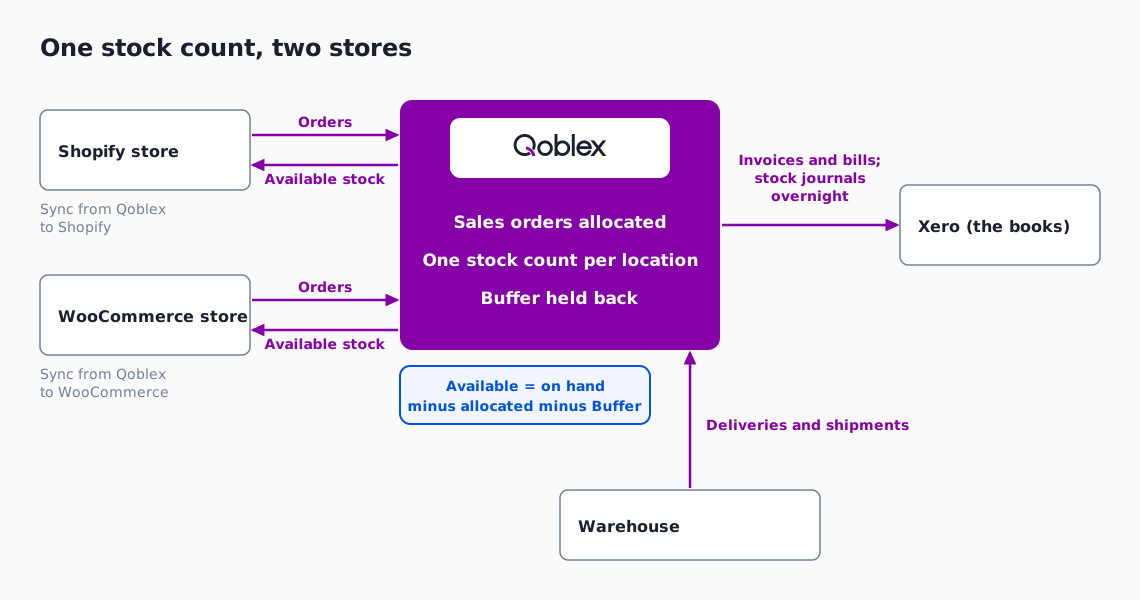
| Step | Before Qoblex | In Qoblex |
|---|---|---|
| Where the stock count lived | Typed by hand into each store, so each store held its own number | One count per location in Qoblex, sent to Shopify and WooCommerce (inventory sync set to Sync from Qoblex to each store) |
| What a store shows | Whatever was typed last | Available: on hand minus allocated to sales orders minus Buffer |
| A sale on one store | The other stores kept the old number until someone typed again | The order is allocated in Qoblex, which lowers the Available figure sent to both stores |
| The last units | Sold from the same shelf by whichever store sold first | Held back by the Buffer at the location, never part of the figure either store shows |
| A delivery arrives | The new total typed into every store | Receiving the purchase order allocates the new stock to Awaiting Stock orders, oldest first, and only the leftover reaches the stores |
A Buffer proves its worth under load, so the fair test is one product through the busiest weekend.
What do Shopify and WooCommerce show through a Black Friday burst with 200 bottles and a Buffer of 20?
A hair and beauty brand with 200 bottles of its hero shampoo on hand and a Buffer of 20 in Qoblex shows 180 on both its Shopify and WooCommerce stores, and that one figure falls as an order on either store is allocated, so the two stores count down the same stock.
Let’s assume the hero shampoo has 200 bottles on hand at the brand’s one warehouse on the evening of Thursday 26 November 2026, the eve of Black Friday, with a Buffer of 20 set weeks earlier and nothing allocated. Each order is for one bottle. Shipping an order takes the bottle off on hand and releases its allocation together, so Available does not move when a parcel leaves, and the table counts orders taken.
| When | Shopify orders | WooCommerce orders | Orders taken so far | Buffer | Available, sent to both stores |
|---|---|---|---|---|---|
| Thu 26 Nov, evening | 0 | 0 | 0 | 20 | 180 |
| Fri 27 Nov, 00:00 to 10:00 | 60 | 30 | 90 | 20 | 90 |
| Fri 27 Nov, 10:00 to midnight | 40 | 20 | 150 | 20 | 30 |
| Sat 28 Nov, 00:00 to 12:00 | 18 | 12 | 180 | 20 | 0 |
| Mon 30 Nov, 08:00, Buffer lowered from 20 to 8 | 0 | 0 | 180 | 8 | 12 |
| Mon 30 Nov, 08:00 to 12:00 | 7 | 5 | 192 | 8 | 0 |
Neither store was handed half of the shampoo: both showed the whole of what was left and counted down the same figure, so by Saturday midday Shopify had taken 118 bottles and WooCommerce 62 without anyone setting that ratio. Meanwhile the warehouse team shipped the orders, nobody typed a number into either store, and customer service had no oversold order to write about for this line. By Saturday noon both stores showed 0 while the 20 bottles in the Buffer were still unsold, which left the team a decision.
What happens to the 20 bottles in the Buffer once both stores reach zero?
When a hair and beauty brand’s Shopify and WooCommerce stores both reach zero, the 20 bottles of hero shampoo in the Buffer stay on hand in Qoblex, so the team decides what they are for instead of the stores selling them. By Sunday evening the warehouse team had shipped all 180 orders, which left 20 on hand, nothing allocated and a Buffer of 20, so Available stayed at 0. The team kept those bottles as a reserve for what customer service needs after a peak, such as a parcel damaged on the way or a bottle found short at the next count. That use was the team’s choice; Qoblex only held the bottles back as a safety reserve, outside the figure either store was sent.
At 08:00 on Cyber Monday, 30 November, the team judged that 8 bottles would cover the damaged parcels and short counts a peak leaves behind, so the person with access to adjustments lowered the Buffer on the Inventory tab and let the rest go back on sale, as the last two rows of the table show. The 8 stayed in the Buffer until after the season. How much to hold back is covered in the Black Friday lessons guide, and the weeks after in restocking holiday returns and clearing slow stock. Before any of this ran, though, the brand had checked how its stores would work in Qoblex.
What did the hair and beauty brand ask about running it in Qoblex?
A hair and beauty brand checking how Qoblex would run its stores asked four things: how products are matched between the stores, how starting quantities get in, whether fulfilling an order in a store reaches Qoblex, and how stock value and cost of goods reach Xero. They are the checks any brand makes before it lets one system own its stock figures.
The first was matching. Qoblex matches an incoming Shopify or WooCommerce product to a Qoblex product the brand already has, by the strategy chosen on each store connection under “How would you like Qoblex to identify and match similar products across different stores?”: Match products by name, Match products by SKU or Match products by barcode. Once linked, that link drives every later update, and because a blank or duplicated SKU on any variant stops the whole product from updating when matching is by SKU, the brand tidied its codes before connecting.
With the products matched, the team needed true starting figures. It filled in Quantity and, for hero lines, BufferQuantity in the stock CSV for its warehouse and uploaded it through Stocktake from CSV. Qoblex made a Draft adjustment that moved no stock until someone chose Authorize now. The Buffer did not wait for that step: Qoblex wrote it at upload. Because a stocktake sets quantities and never unit cost, the team set opening cost before authorising. Counting the fast movers before Black Friday covers which lines to count carefully.
The warehouse team also wanted to keep fulfilling in the stores, and an order fulfilled in Shopify or completed in WooCommerce reaches Qoblex either way, by a different path. When the team marks an order fulfilled in Shopify, Qoblex allocates its stock, and the shipment, with its tracking number, location and dispatched status, appears in Qoblex once Shopify’s update to that order comes through. For an order Completed in WooCommerce, Qoblex builds and dispatches the shipment itself from the stock it reserved, without a carrier or tracking number.
The last question was about the books. Qoblex posts the brand’s authorised invoices and bills to Xero, and the entries for stock on hand, cost of goods sold and stock adjustments go once a day on an overnight sync. Products sync to Xero as untracked items, so Xero is not valuing the stock a second time. Two way payment sync is an optional, separate setting in the Xero overview, and inventory software that syncs with Xero and Shopify goes wider. What remains is the path of a single order.
How does one Black Friday order move from a store to the shelf in Qoblex?
One Black Friday order for a hair and beauty brand moves from a Shopify or WooCommerce store to the shelf in seven steps in Qoblex, and the Available figure sent to both stores falls by the one bottle.
- A customer orders one bottle of the hero shampoo on the Shopify or WooCommerce store while that store shows a quantity above zero.
- Qoblex creates the sales order and allocates it: a Shopify order from the mapped Qoblex location, a WooCommerce order from the locations picked under “Which locations to fulfill WooCommerce sale orders from?”, first location with available stock first.
- Available, which is on hand minus allocated minus Buffer, falls by one, and Qoblex sends the new figure to both stores.
- The order shows Ready To Ship on the Sales list, because every line is fully allocated.
- The warehouse team picks and packs the bottle and marks the order fulfilled in Shopify, or Completed in WooCommerce.
- Qoblex records the shipment as dispatched, which takes the bottle off on hand and releases its allocation.
- Qoblex posts the authorised invoice to Xero, and the stock movement reaches Xero in the overnight inventory journal.
Nothing in those steps asks anyone to type a stock figure into a store. Whether that suits another business depends on where it sells and how many stores share one shelf.
Does this fit your business?
Qoblex fits a hair and beauty brand, and its neighbours in skincare, cosmetics, fragrance, supplements and candle or home fragrance, when the same catalogue sells on Shopify and WooCommerce and stock is typed into each store by hand. Each runs it the same way, with one count per location and a Buffer on the lines that sell out, and a supplements brand treats its lot or expiry needs as a separate question.
Qoblex does not fit a seller who needs stock pushed to Etsy, eBay or Amazon: there is no Etsy or eBay connection, and Amazon orders and returns come in but no stock goes out, so those stores keep the marketplace’s own inventory tools. A single Shopify store with one location is likely well served by Shopify itself: Shopify’s help centre says, “You can track and manage your store’s inventory levels on the Inventory page of your Shopify admin.” A single WooCommerce store follows the same logic. The need starts at the second store. A brand that splits stock by channel or ships from a 3PL should read a skincare brand with a 3PL for Shopify and its own warehouse.
Frequently asked questions
How do I stop overselling on Black Friday across several online stores?
Keep one stock count in Qoblex, set inventory sync to Sync from Qoblex to Shopify or Sync from Qoblex to WooCommerce, and stop typing stock into the stores. Set a Buffer on the lines that sell out. Each store then shows available stock: on hand minus allocated minus Buffer.
How does Qoblex sync inventory between Shopify and WooCommerce?
Qoblex sits between a Shopify store and a WooCommerce store and sends its own available stock to each, set as Sync from Qoblex to Shopify and Sync from Qoblex to WooCommerce. Qoblex never pulls a stock change made in WooCommerce back in, and a number typed into either store is replaced by the next Qoblex update.
What is a buffer in inventory sync?
A buffer is stock held back at a location as a safety reserve. In Qoblex it is set per variant and location on the Inventory tab, or in bulk through the BufferQuantity column of Stocktake from CSV. It is zero or positive and never part of the figure the stores are sent.
Is the stock update to my stores instant?
Qoblex does not quote a fixed time for a store to show a new stock figure, so in a rush of orders two stores can briefly sell from the same last units. A Buffer does not close that gap. An order taken after Available reaches zero waits in Qoblex as Awaiting Stock, while the units held in the Buffer stay on hand for the team to decide what they are for.
Can a Continue selling when out of stock setting cause overselling?
Yes. With Continue selling when out of stock on, Qoblex reserves the full ordered quantity and shows the order as Ready To Ship with no stock behind it. To stop that in Qoblex, untick Continue selling when sold out on each store connection, turn the setting off in Qoblex, then deallocate and reallocate open orders, per the checklist. Each store keeps its own setting, so turn it off there too.
Can a gift set oversell?
In Qoblex, a gift set sold as a bundle can oversell only when every one of its parts is allowed to oversell. Its stock is worked out from the stock of its parts, so if even one part sells only from real stock, the set cannot oversell either.
What happens when a delivery arrives after the stores sold out?
When the purchase order is received, Qoblex allocates the new stock to sales orders that are Awaiting Stock, oldest first, and only what is left over reaches the stores. Old open orders that were already fulfilled or will never ship can take the whole delivery, so clear them first.
How does a hair and beauty brand keep selling items it drop ships or sources on demand?
In Qoblex, a variant set to Always Dropship or Optional Dropship can go to its supplier from a sales order with the Drop Ship action, which raises a Drop Ship purchase order per supplier. Continue selling when out of stock is set per product, so it can stay on for those lines alone, and their orders show Ready To Ship.
Why does typing stock into each store oversell?
When stock is typed into each online store by hand, each store keeps its own number, and a sale on one changes nothing on the others until someone types again. On a quiet week the next update catches up; at a holiday peak orders outrun the typing. How overselling happens covers the wider pattern.
Are the Shopify and WooCommerce integrations included in every plan?
On Qoblex’s Starter and Business plans, integrations, including the Shopify, WooCommerce and Xero connections, are a paid add-on. Current prices and what each plan includes are on the Qoblex pricing page, which is the place to check before connecting a store or the books.