



To count before Black Friday, rank last November’s units by product, pick the SKUs that carried the bulk of them, and add only those to one Qoblex stocktake adjustment. Two counters scan them in one evening after dispatch. The counts sit in a draft, lines that match on hand resolve themselves, and nothing changes the stock your stores sell from until someone authorizes.
A forecast and a Buffer both start from the on-hand figure, so the count comes first. The wider plan is in our Black Friday inventory checklist; this piece is the count itself, scaled to one evening.
Why count only the fast movers before Black Friday instead of the whole stock?
A brand that ships from a warehouse in November should count only the SKUs last year’s peak depended on, because a full stocktake needs more hours than the weeks before Black Friday can spare, while a Qoblex stocktake adjustment of the fast movers fits one evening and still fixes the on-hand figure the Buffer and the reorder start from. The Buffer and the order quantity are both arithmetic on On Hand, so a figure that is wrong by a few units on a hero SKU stays wrong in every later step. Our forecast guide does the sizing, the checklist places the count among the weeks, and our inventory counting guide covers the methods, from a full count to a cycle count and ABC ranking.
In our reading, a cycle count of the fast movers is an honest scoping choice rather than a shortcut: it covers the SKUs the peak depends on and does not replace a full stocktake. What keeps one evening calm is that the counts wait in a Qoblex draft until someone has reviewed and authorized them. The first question is which SKUs make the list.
How do you pick the 40 SKUs worth counting?
In Qoblex, a brand picks the SKUs to count by opening Reporting, then Sales, then the Products tab, setting a date range for last year’s run-up, grouping by Product and sorting by Sold Quantity, so the top of the list is the SKUs that carried the units. Let’s assume a Shopify brand that sells skincare and hair care from one warehouse and keeps its books in Xero. It has 250 active SKUs. Last year it sold 6,000 units from Saturday 1 November to Monday 1 December 2025, and the team counts on Tuesday 17 November.
The stock lead sets that range in the report’s date filter so it holds both Black Friday on 28 November and Cyber Monday on 1 December 2025. The Products report, a different one from our forecast guide’s, opens filtered to Open and Closed orders, and grouped by Product each row carries an Orders count and the quantity totals.
Reading down the sorted list, the lead keeps a running total of Sold Quantity in a spreadsheet; Export Report saves a CSV with the grouping and sorting kept for a spreadsheet. The running total reaches 4,200 of the 6,000 units at the 40th SKU, which is 70%. A brand that sells gift sets switches the report from bundle rows to the component items, because the shelf holds the parts. The reporting overview dates report data from January 2025, or July 2025 for Stock Movement and Inventory Turnover, so last November is covered either way.
In our reading, two judgement calls sit on top of the ranking. A SKU new in this year’s promotion has no history, so the lead adds it by hand, and 40 is what one evening holds for this team, not a rule. Next come the evening and the people in it.
When should the count happen, and who needs which permission?
The count belongs in an evening in the week of 16 November, after the day’s dispatch has left, because Qoblex re-reads On Hand each time a line is scanned or reconciled, so parcels leaving mid-count would move the figure the counters are checked against. Our lead times guide sets Monday 16 November as the sellable-by date and leaves 17 and 18 November for the count and the Buffer, so the supposed brand counts on Tuesday 17 November from 6:00 to 9:00 p.m. The stock lead builds the adjustment around 4:30 p.m., and by 6:00 the parcels are gone.
The evening needs three people. The two counters need only the View Adjustments permission: each opens the adjustment from Stock Control, then Adjustments, filtered by its Number, and sees only their own counts. Settling the lines takes Reconcile Adjustments and posting them takes Authorize Adjustments, which the permissions guide grants separately. Here one stock lead holds both; a brand that wants a second set of eyes gives them to two people. With the roles agreed, the lead builds the adjustment.
How do you count the 40 SKUs with two scanners in Qoblex?
Qoblex lets two people count the same stocktake adjustment with scanners at one location, turns it into a reconciled multi-user count when the second person scans, and holds every counted quantity in a Draft that changes no stock until someone chooses Authorize. In the afternoon the stock lead puts every product on the adjustment through Add Products before the second counter scans, because the button disappears once the adjustment becomes a multi-user count. A scanned product that was never added is still added, so the lead tells both counters to scan only the 40.
On the shelf, the habit is one scan to match and then the shelf total with Set, because a match already records one unit under Add, and a counter who scans just to look inflates their own count. Set replaces that counter’s running count, and Set 0 records an empty shelf. None of the 40 is batch or lot tracked, so the whole list stays on the scanner route.
- Open Stock Control, select Adjustments, then New Adjustment, and choose the Adjustment Reason Stocktake and the Location.
- Select Add Products, search or use Filter by product tag to find the 40 SKUs, tick them, then select Add Selected.
- Select Save, then share the adjustment’s Number with both counters.
- Have each counter open the adjustment by its Number, select Start Scan, scan each product and enter the shelf total with Set.
- Filter the line items grid by Status to find the lines that are Pending or in Conflict.
- Reconcile the lines: Merge Scanners for SKUs counted on two shelves, Reconcile on each of the rest after checking the shelf.
- If Authorize opens Can’t Authorize Yet, select Move to a New Adjustment to split out the unreconciled lines.
- Select Authorize, then confirm in the Authorize Adjustment dialog.
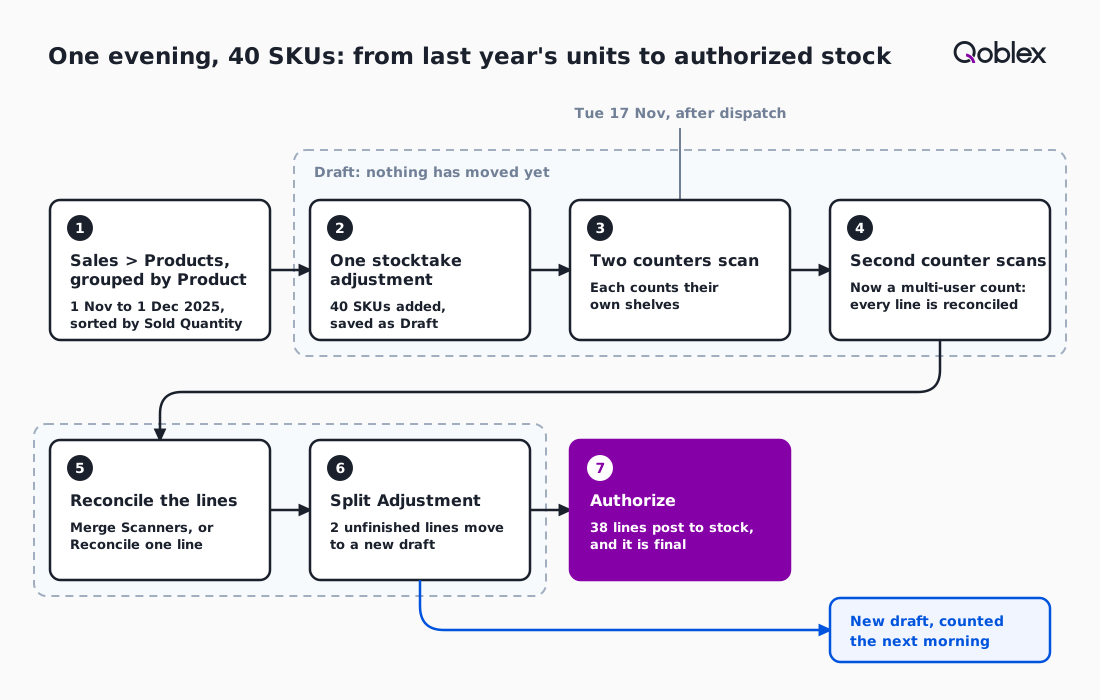
The second counter’s first count makes the adjustment a multi-user count, automatically and permanently, logged in the Activity Feed. From then on every line must be reconciled before Authorize, a line whose single count equals On Hand resolves on its own, and the total stays provisional until the last line is settled. By about 7:30 p.m. both counters are done.
What does the evening produce, line by line?
The supposed evening’s Qoblex adjustment produces 40 lines: 29 that resolve on their own, 5 single counts that differ from On Hand, 4 SKUs on two shelves that are merged, and 2 lines nobody reached, which leaves 38 lines to authorize and 2 to finish the next morning.
| Lines | What the grid showed | How it was settled | Variance |
|---|---|---|---|
| 29 | One counter's count equal to On Hand | Resolved on its own, no action | 0 on each |
| 5 | One counter's count different from On Hand, Status Conflict | Reconcile, one line at a time, after a look at the shelf | -4, -2, -1, +3, -6 |
| 4 | Counted by both, on two shelves, counts differ, Status Conflict | Reconcile Selected with Merge Scanners | 0, 0, 0, -2 |
| 2 | Nobody counted them, Status Pending | Split Adjustment into a new draft for Wednesday morning | Not known yet |
| 40 | 38 reconciled and authorized, 2 moved out | Net -12 on the 38 | |
The five single counts that disagree get a look at the shelf first, because a count that differs from the system is either a miscount or a real difference, and only the shelf can say which. Reconciling a line records the agreed quantity and moves no stock, so the stock lead can take 7:30 to 8:30 p.m. over them. The four SKUs on two shelves were counted once by each person, which is why Merge Scanners suits them: it sets each line to the sum of every scanner’s latest count, the strategy the help centre gives for counters who split a location into zones.
The two lines in the bay nobody reached stay Pending, so Authorize opens Can’t Authorize Yet, and at about 8:45 p.m. the lead moves them out. Split Adjustment puts the unreconciled lines in a new draft at the same location and leaves the 38 reconciled lines ready to authorize. That draft is a multi-user count too, so its two lines are counted on Wednesday morning, 18 November, and reconciled before it can be authorized. Across the 38, Variance, the reconciled quantity against On Hand, nets to minus 12 units, and none of it is in stock until Authorize.
What happens after Authorize, and where does the Buffer come in?
After the person with the Authorize Adjustments permission chooses Authorize, the 38 reconciled lines are applied to On Hand at the location and the adjustment cannot be turned back into a draft, so a wrong count is fixed with a new adjustment, and the Buffer is then set from the new figures. Once the lead confirms in the Authorize Adjustment dialog, the line items and location are locked.
With On Hand corrected, the team sets the Buffer, the quantity held back from sale, on the hero SKUs: on each variant’s Inventory tab, by a user with access to adjustments, or in the one-pass CSV count in our checklist. The available stock the store shows is on hand minus allocated minus buffer, so the Buffer protects the weekend only when the figure under it is true, and our lessons guide covers how large it should be. Whatever will not sell belongs to the week after Cyber Monday, in our slow stock and returns guides.
When is a full stocktake or a paper count enough?
A full stocktake is enough for a brand with a few dozen SKUs that can count everything in one evening, and a paper count is enough for a team without scanners, because picking the fast movers only saves time when the catalogue is too big to count in one sitting. A clipboard and a calm evening are a real stocktake, and one person counting alone has nothing to reconcile, as the adjustments overview describes. A brand that suspects drift across the whole catalogue should count all of it, because the 40 leave every other SKU untested.
A team without scanners can count the 40 on paper with Stocktake from CSV. The stock lead filters the file by Tags, Brand, Supplier or Product Type, the team fills in its counts and uploads it, and the draft reads “Nothing has been added to or removed from stock yet.” Uploading needs Authorize Adjustments; the steps are in our checklist and the overview on our stocktake software page.
Frequently asked questions
Do I need to count all my stock before Black Friday?
In our reading, a brand need not count all its stock when the catalogue is too big for one evening. Count the SKUs that carried the bulk of last year’s peak units, so the Buffer and reorder start from a true figure. A full count stays right for a small catalogue or suspected drift.
How do I choose which SKUs to count before Black Friday?
In Qoblex, open Reporting, Sales, then Products, set last year’s run-up as the date range, group by Product and sort by Sold Quantity. Read down until the running total reaches the share you want; in the example, 40 SKUs carry 4,200 of 6,000 units. Add new promoted SKUs by hand.
Can two people count the same stocktake in Qoblex?
Yes, in Qoblex. When a second, different person records a count on the same adjustment, it becomes a multi-user count, automatically and permanently, and every line must be reconciled before Authorize. Add every product first, because Add Products then disappears.
Can I scan batch or lot tracked products in a stocktake?
Not yet in Qoblex. When a counter scans a batch or lot tracked product, Qoblex shows it as Not Supported Yet and records no count, and the miss is collected under Missed Scans. Count those products by hand and pass the number to whoever reconciles the adjustment.
How do I load opening stock after a manual count?
In Qoblex, opening stock goes in one location at a time with Stocktake from CSV: download the file, fill in the counted quantities and upload it. It lands as a Draft and nothing moves until Authorize. Set each product’s opening cost before authorizing, because a stocktake sets quantities, never cost.
Who needs which permission for a stocktake?
Counters need only View Adjustments and see only their own counts. Reconcile Adjustments settles the lines of a multi-user count; Authorize Adjustments posts it and is also needed to upload a Stocktake from CSV file. The three are granted separately.